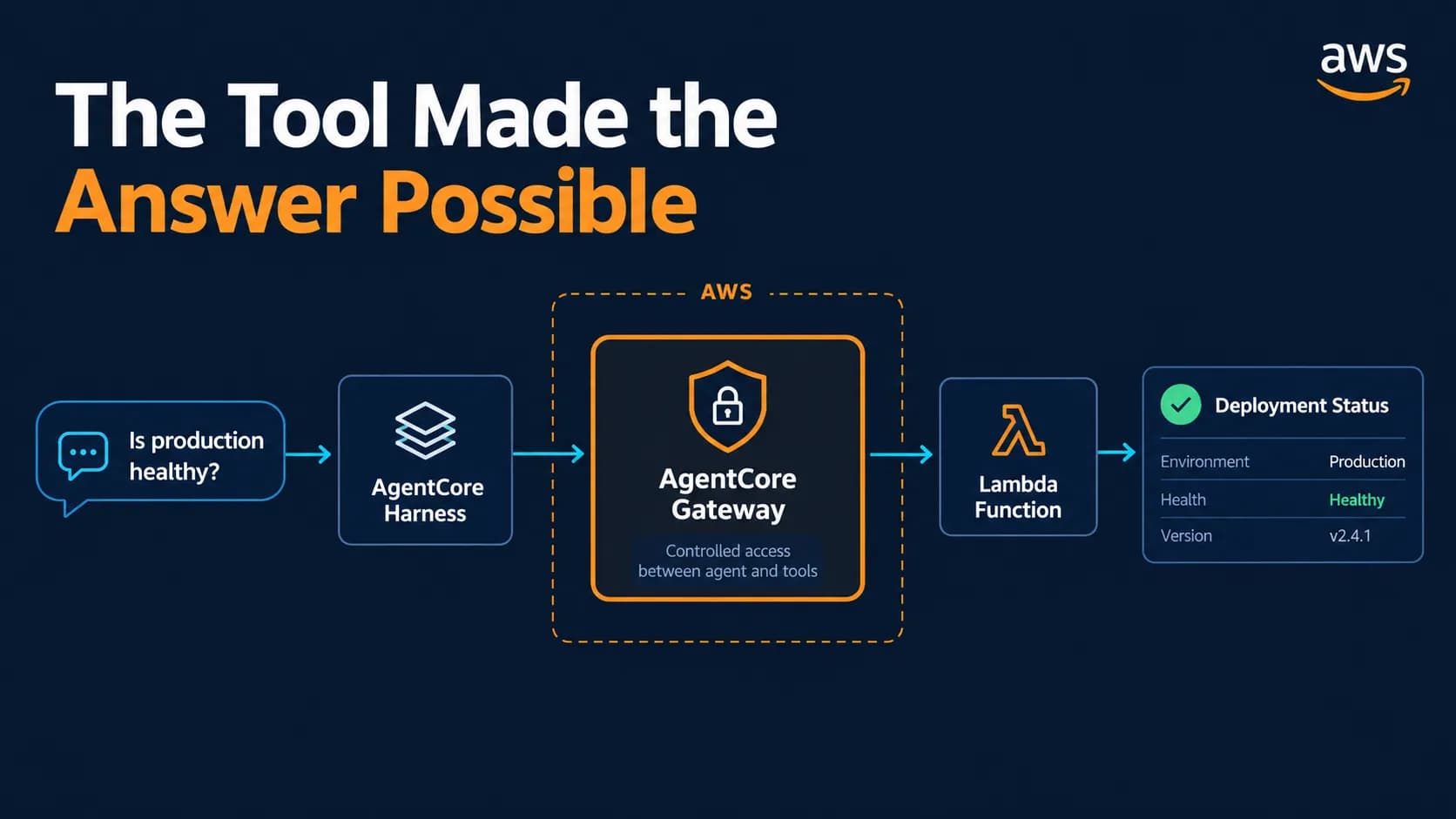
My first CloudOps agent could not tell me whether production was healthy.
That was the correct answer. It had a model and a system prompt, but it had no connection to deployment data.
For the next experiment, I asked the same question again:
Is production healthy?
This time, the agent returned the service name, deployed version, instance count, active alarms, and observation time.
The model had not suddenly learned how to monitor an environment. I had given it a controlled way to ask another system for evidence.
The Missing Piece Was a Tool
I kept the architecture deliberately small:
User
  |
  | "Is production healthy?"
  v
AgentCore Harness
  |
  | selects get_deployment_status
  v
AgentCore Gateway
  |
  | invokes a registered target which is AWS Lambda
  v
AWS Lambda
  |
  | returns a deterministic deployment snapshot
  v
Tool grounded answer
The Harness still used Amazon Nova Micro. Memory remained disabled for this stage.
I added one read only Lambda named AgentCoreCloudOps-DeploymentStatus. It did not connect to my real production systems or to the existing three-tier application. It returned a deterministic snapshot for a sample service named blog-api.
That limitation was intentional. Before connecting an agent to real operational systems, I wanted to understand the path from a question to a tool call and back.
I Defined Healthy in Code
I did not ask the model to decide what healthy meant.
The Lambda compared three conditions:
def determine_status(snapshot):
    versions_match = (
        snapshot["desired_version"] == snapshot["running_version"]
    )
    instances_healthy = (
        snapshot["healthy_instances"] == snapshot["desired_instances"]
    )
    alarms_clear = len(snapshot["active_alarms"]) == 0

    return (
        "healthy"
        if versions_match and instances_healthy and alarms_clear
        else "unhealthy"
    )
The handler also rejected missing or unsupported environments. Only production was accepted:
environment = event.get("environment")

if not isinstance(environment, str) or not environment:
    return {
        "ok": False,
        "error": "environment is required and must be a string.",
    }

if environment != "production":
    return {
        "ok": False,
        "error": f"Unsupported environment: {environment}",
    }
SAM and Docker Gave Me a Local Lambda Test
I defined the function with AWS Serverless Application Model
Resources:
  DeploymentStatusFunction:
    Type: AWS::Serverless::Function
    Properties:
      FunctionName: AgentCoreCloudOps-DeploymentStatus
      Runtime: python3.12
      Architectures:
        - arm64
      Handler: app.lambda_handler
      CodeUri: .
      MemorySize: 128
      Timeout: 5
SAM supplied the Lambda project and invocation workflow. Docker supplied a local Linux container that matched the Lambda runtime closely enough to test the handler before deploying it.
The first local attempt reported:
Running AWS SAM projects locally requires Docker.
Have you got it installed and running?
Docker Desktop was already running. The message described the symptom, not the cause.
Debug output showed that the installed SAM CLI was trying to use Docker API version v1.35, while the Docker engine required at least v1.40. Updating SAM fixed the compatibility problem.
After updating SAM, I moved into the Lambda project and invoked the function with the production event:
cd lambda/deployment_status

sam local invoke DeploymentStatusFunction \
  --event events/production.json
SAM mounted the function under /var/task and returned:
{
  "environment": "production",
  "service": "blog-api",
  "deployment_id": "deploy-1042",
  "desired_version": "2026.09.20.1",
  "running_version": "2026.09.20.1",
  "healthy_instances": 3,
  "desired_instances": 3,
  "active_alarms": [],
  "status": "healthy",
  "observed_at": "2026-09-22T01:26:17Z",
  "ok": true
}
This invocation ran inside Docker, so it did not need an active AWS login. The next test moved the same function into AWS.
I built and deployed the SAM application:
sam build
sam deploy --guided --region us-east-2
I then invoked the deployed Lambda directly through AWS:
aws lambda invoke \
  --function-name AgentCoreCloudOps-DeploymentStatus \
  --region us-east-2 \
  --cli-binary-format raw-in-base64-out \
  --payload '{"environment":"production"}' \
  /tmp/deployment-status-response.json
The AWS CLI saved the function response to a file, so I inspected it separately:
cat /tmp/deployment-status-response.jsonThe deployed function returned:
{
  "environment": "production",
  "service": "blog-api",
  "deployment_id": "deploy-1042",
  "desired_version": "2026.09.20.1",
  "running_version": "2026.09.20.1",
  "healthy_instances": 3,
  "desired_instances": 3,
  "active_alarms": [],
  "status": "healthy",
  "observed_at": "2026-09-22T01:47:28Z",
  "ok": true
}
This verified the deployed Lambda independently. AgentCore Gateway and the Harness were not involved yet.
The Tool Schema Told the Agent What It Could Ask
Deploying the Lambda did not automatically make it an agent tool.
I created a JSON schema that described one operation:
{
  "name": "get_deployment_status",
  "description": "Get the deployment health of the blog-api service in a supported environment. Use this tool when asked whether production is healthy, which version is running, whether instances are healthy, or whether deployment alarms are active.",
  "inputSchema": {
    "type": "object",
    "properties": {
      "environment": {
        "type": "string",
        "description": "The environment to inspect. Currently only production is supported."
      }
    },
    "required": ["environment"]
  }
}
The schema was more than documentation. It gave the model a name, purpose, and input contract for the operation.
AgentCore Gateway registered the Lambda as DeploymentStatusTarget and exposed the operation through a managed tool interface. The Gateway used AWS_IAM for inbound authorization, and the Harness referenced the Gateway as an agentcore_gateway tool.
The responsibilities were now separate:
Harness  -> decides whether to call the tool
Gateway  -> exposes and routes the tool call
Lambda   -> validates the input and calculates health
Model    -> explains the structured result
That separation was the main reason for the experiment. The model could select the deployment status operation, but it did not define the health rule. This Gateway exposed no deployment or rollback operation, and the Lambda itself was read-only.
The Gateway Existed, but the Protocol Was Wrong
My first Gateway deployment appeared successful. The Lambda target also existed.
I first asked the Gateway to list the tools it exposed:
agentcore invoke \
  --gateway CloudOpsGateway \
  "list-tools"
That command failed with:
--target-name is required for HTTP gateways.
Available targets:
I had created the Gateway with no MCP protocol configured. The client therefore treated it as an HTTP Gateway and expected a target name.
That was not the interface I wanted. The Harness needed to discover the Lambda operation as a tool through the Model Context Protocol.
I changed the Gateway configuration to:
{
  "name": "CloudOpsGateway",
  "protocolType": "MCP",
  "authorizerType": "AWS_IAM"
}
I validated and redeployed the corrected Gateway configuration:
agentcore validate
agentcore deploy --dry-run
agentcore deploy
I then invoked the Lambda tool directly through the Gateway:
agentcore invoke \
  --gateway CloudOpsGateway \
  "call-tool" \
  --tool "DeploymentStatusTarget___get_deployment_status" \
  --input '{"environment":"production"}'
{
"environment": "production",
"service": "blog-api",
"deployment_id": "deploy-1042",
"desired_version": "2026.09.20.1",
"running_version": "2026.09.20.1",
"healthy_instances": 3,
"desired_instances": 3,
"active_alarms": [],
"status": "healthy",
"ok": true
}This verified the Gateway to Lambda path without involving the Harness. After that, I attached the Gateway to the Harness and redeployed the project.
This was a useful failure. A resource can exist, its target can exist, and the connection can still be wrong for the client using it.
The Same Question Finally Produced Evidence
Finally, I invoked the Harness and explicitly asked it to use the deployment status tool:
agentcore invoke \
  --harness CloudOpsHarness \
  --verbose \
  "Use the deployment status tool to check production. Is production healthy? Include the versions, instance count, active alarms, and observation time."
This time it selected DeploymentStatusTarget, invoked the Lambda, and summarized the returned fields:
Environment: production
Service: blog-api
Deployment ID: deploy-1042
Desired version: 2026.09.20.1
Running version: 2026.09.20.1
Healthy instances: 3
Desired instances: 3
Active alarms: 0
Status: healthy
The Harness concluded that production was healthy because all three instances were running the desired version and the tool reported no active alarms.
What Comes Next
The tool solved one problem: the agent could retrieve a current result instead of guessing.
It did not solve continuity between conversations. In the next stage, I added AgentCore Memory so the agent could remember a user's preferred environment across sessions.